2/5/25: After our last phone server upgrade, our previously recorded voicemail messages were no longer working.
The calls were going to voicemail, but then dropping. The caller was unable to leave a message. No option available.
The remedy:
To set-up voicemail through the Switchboard:
Click on your name on the top right corner of the screen
Click Switchvox Home - this takes you to your extension site
Choose Voicemail/Fax on the top menu
Choose Voicemail options
FOR THIS ONE INSTANCE, YOU MUST DELETE THE CURRENT RECORDING(S) by clicking the red ‘x’ next to the recording(s)
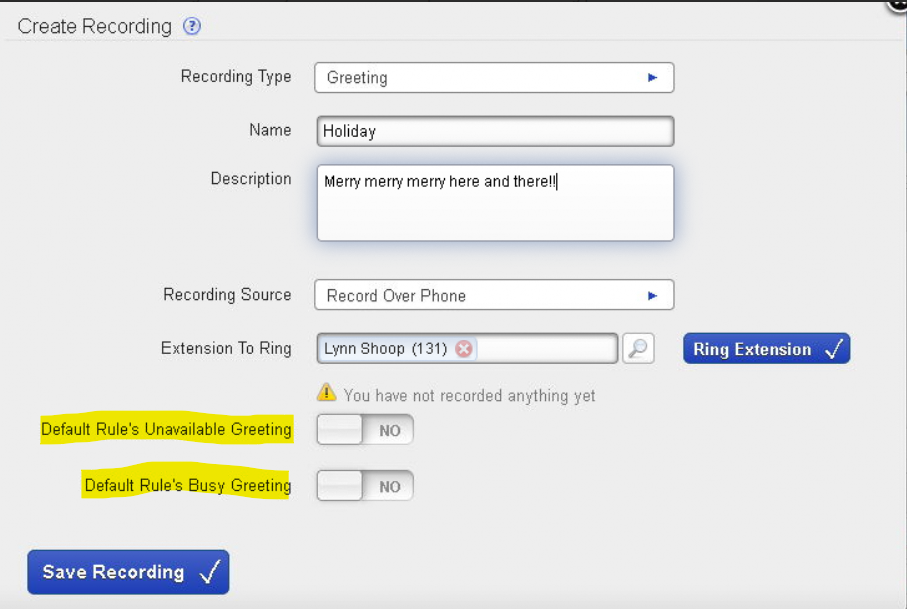
Click Create Recording
Make sure Recording Type is “Greeting”
Name it accordingly (see highlighted section below for examples)
Make sure Recording Source is “Record Over Phone”
Have your message ready to go
Click “Ring Extension” and your phone will ring
Follow the prompt
After you have recorded your greeting:
in Switchvox Home
click Voicemail/Fax from top dropdown menu
click Voicemail Options
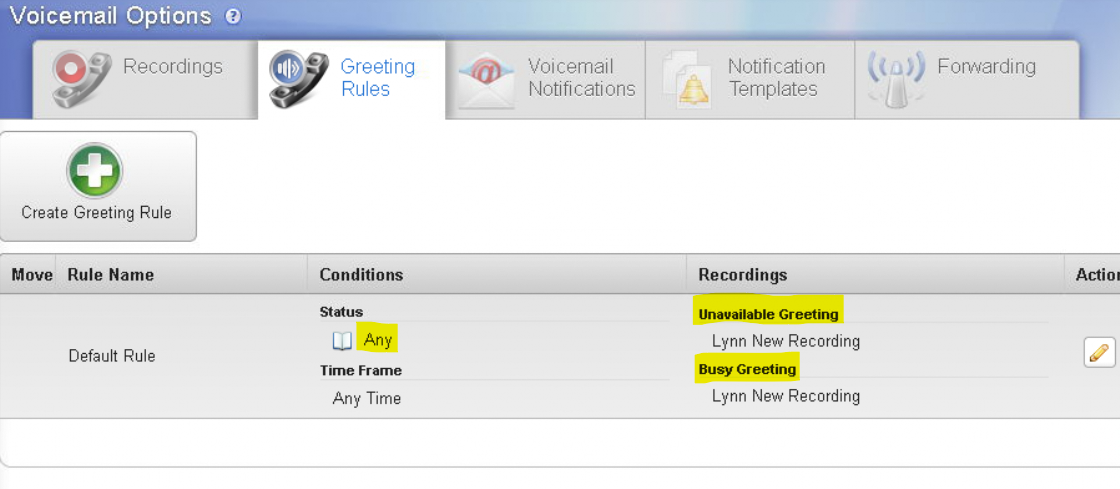
click the ‘Greeting Rules’ tab
click on the edit icon (pencil)
set the unavailable and/or busy greeting to the voicemail you just recorded - select ‘Standard Greeting’ from the drop down list and save.
Check Voicemail Notifications
in Switchvox Home
click Voicemail/Fax from top dropdown menu
click Voicemail Options
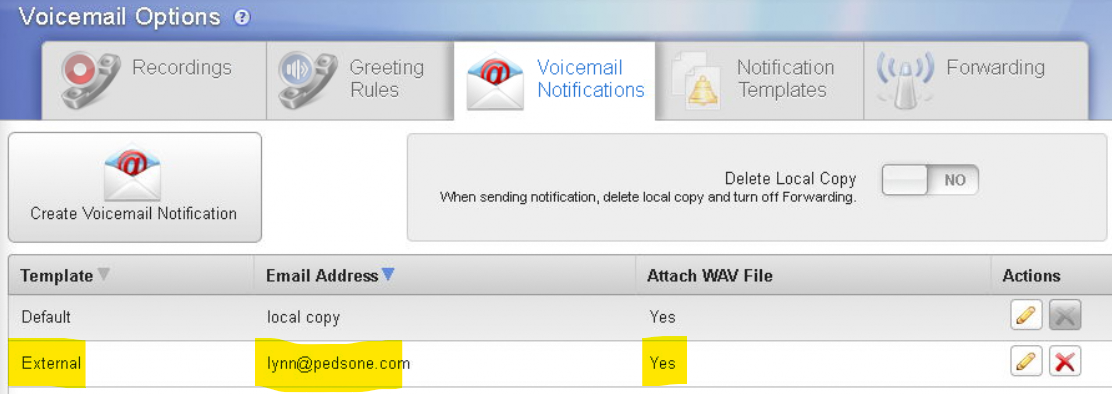
click the ‘Voicemail Notifications’ tab
Make sure that your email is listed under External Template
To create a HOLIDAY recording:
in Switchvox Home
click Voicemail/Fax from top dropdown menu
click Voicemail Options
Create
Leave ‘greeting’
name ‘Holiday’
leave the two toggles at the bottom at ‘no’
ring extension
Make sure Recording Source is “Record Over Phone”
Have your message ready to go
Click “Ring Extension” and your phone will ring
Follow the prompt
Sample Greeting:
You have reached NAME at extension ###.
I am away from my desk right now.
If you need immediate assistance, please dial zero,
otherwise you can leave a detailed message here.
Please be sure to leave your phone number and your account number,
or if you don’t have your account number,
you can leave your child’s name and date of birth.
You can also email me at NAME@pedsone.com, that’s N-A-M-E@PEDSONE.com
Thank you!
Sample Holiday Greeting:
You have reached Han at extension 5858.
PedsOne will be closed for the Holidays starting at 5pm on Friday, December 20th, and we will resume our normal business hours on Monday, December 30th.
Please leave a detailed message here and I will return your call upon my return.
Please be sure to leave your phone number and your account number.
If you don’t have your account number, please leave your child’s name and date of birth.
If you prefer, you can email me at han@pedsone.com, that’s H-A-N@PEDSONE.com
Was this article helpful?
That’s Great!
Thank you for your feedback
Sorry! We couldn't be helpful
Thank you for your feedback
Feedback sent
We appreciate your effort and will try to fix the article