Please follow these instructions to request approval from the Cigna Health Improvement Fund
NOTE: all reimbursement information must be submitted prior to the EOB on 12/31 of the current year, otherwise the funds are forfeited.
1. Complete the Form: Fill out the Cigna Health Improvement Fund Approval Form.
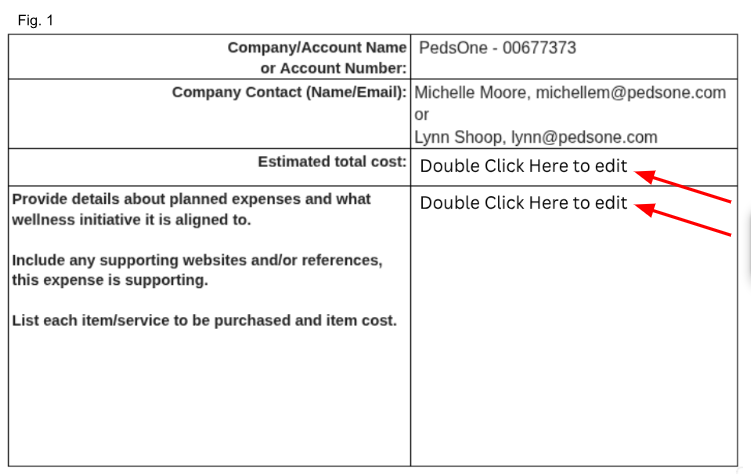
Update the two fields indicated below (Fig. 1) with the correct information.
You can edit this directly in Canva (linked above) and save it as a PDF.
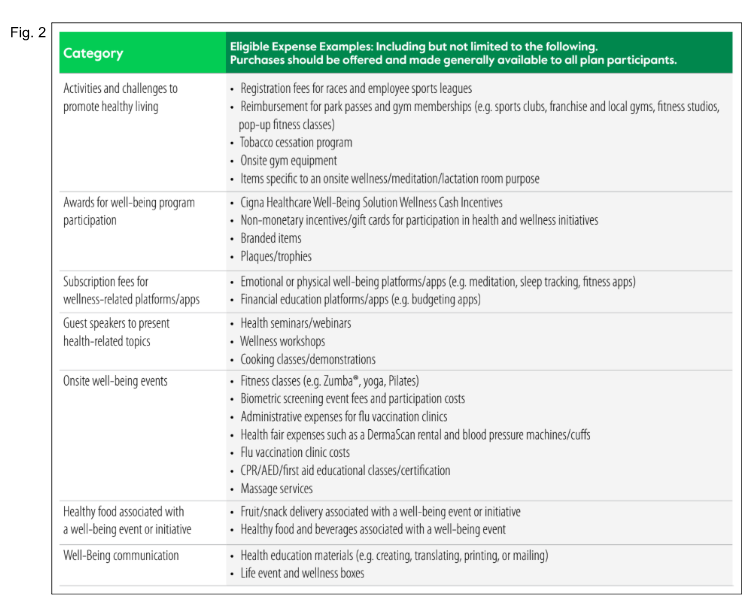
Refer to the eligible expenses chart (Fig. 2) to complete the "Provide Details" section.
2. File Naming, Use this Format: Cigna HIF $[Amount] [Date] [Staff Name].pdf
example: Cigna HIF $40. 1.1.26. Lynn S.pdf
3. Email Subject, Use: PedsOne HIF Approval Request $[Amount].
4. Email Body:
We are requesting approval for the purchase of [Quantity] [Item] in the amount of $[Amount] plus tax (if applicable).
***NOTE: Please also include the specific item and the staff member's name for our records.
5. Recipients: Email the request to: Zehra Kazmi our assigned rep, zehra.kazmi@cignahealthcare.com and cc HealthEngagement@CignaHealthcare.com.
In the event Zehra isn't available, someone from the team will field the request in her absence.
- Pre-Approval: All items must be approved before purchase to be eligible for reimbursement.
- Documentation: Receipts must be submitted in PDF format.
- Timeline: Responses usually arrive within 24 hours but can take up to a week. If you have not heard back after five days, please send a follow-up email.
Currently, reimbursement tracking is 'under construction'.
Karina can answer any necessary questions.
Was this article helpful?
That’s Great!
Thank you for your feedback
Sorry! We couldn't be helpful
Thank you for your feedback
Feedback sent
We appreciate your effort and will try to fix the article