Problems:
- The feeder on the top of my printer isn't responding
- The Document Scanner app gives 'unable to communicate with the printer' error message
- The Document Scanner app gives 'pick a new save location' (or similar) error message
- Can scan from the flatbed only
Troubleshooting Steps:
- Reboot your computer and Mikrotik
- Pick a New Save Location - 'drive' to a new location and save the file there (i.e. your desktop or a folder on your desktop. Some place different than the current location)
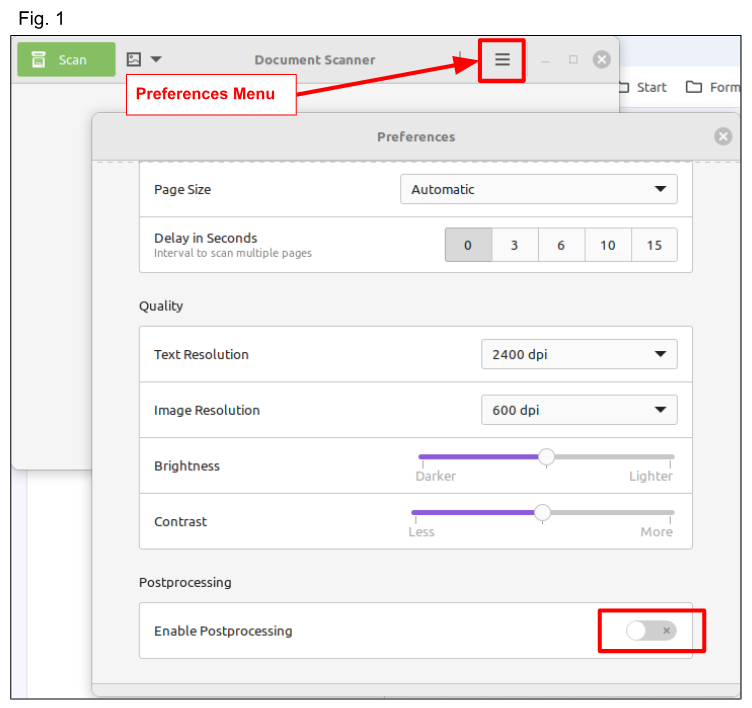
- Turn off the 'Enable Post processing' toggle in the Document Scanner Preferences (Fig. 1)
- On the printer control panel:
- Press Menu
- Press the Up or Down arrow key to select Network. Press OK
- Press the Up or Down arrow key to select Wired LAN or WLAN. Press OK
- Press the Up or Down arrow key to select Wired Enable or WLAN Enable. Press OK
- Press the Up or Down arrow key to select On or Off. Press OK
- Press Stop/Exit or Cancel
Was this article helpful?
That’s Great!
Thank you for your feedback
Sorry! We couldn't be helpful
Thank you for your feedback
Feedback sent
We appreciate your effort and will try to fix the article