If you're experiencing faint, light, faded, or blank printed pages, follow the steps listed below:
- Quickly press OK three times to print the Printer Settings report.
- If the print quality is acceptable, the issue has been resolved.
- If the print quality is not acceptable, perform a manual drum cleaning
Manual Drum Cleaning:
- Open the front cover and remove the drum and toner assembly
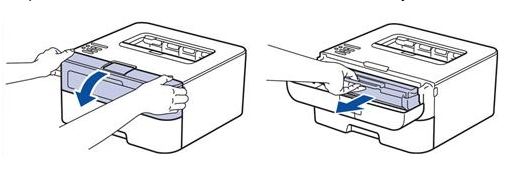
NOTE: place the drum unit and toner cartridge assembly on a piece of paper or paper towel in case you accidentally spill or scatter toner
- Push down on the green lock lever on the left side of the drum unit and then lift the toner cartridge out of the drum
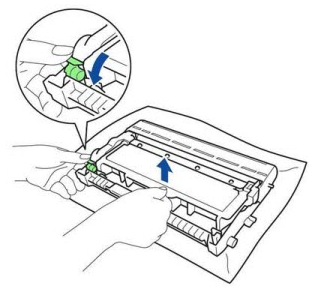
NOTE: handle the toner cartridge carefully. If toner scatters on hands or clothing, immediately wipe it off or wash it with cold water.
- Clean the roller inside the drum unit by gently wiping the entire surface with a lint-free cloth or cotton swap lightly moistened with isopropyl (rubbing) alcohol
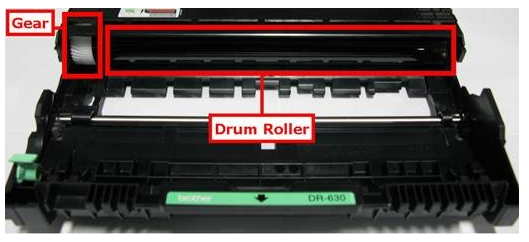
- If physical damage (scratches, nicks, gashes, etc.) is found when inspecting the drum, there is no need to continue cleaning because it will not resolve the issue
- Before continuing further, allow the alcohol to completely evaporate or dry off drum surface
- Once the drum surface is dry, clean the primary corona wire inside the drum unit by gently sliding the green tab located at the top of the drum from left to right and back several times. Be sure to return the green tab to the Home position
- If the green tab isn't returned to the Home position, pages may print with a vertical stripe
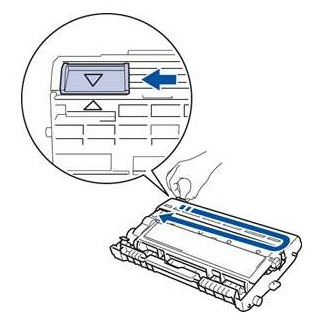
- Reinstall the toner into the drum unit, making sure it clicks into place. When you put it in properly, the green lock lever with lift automatically
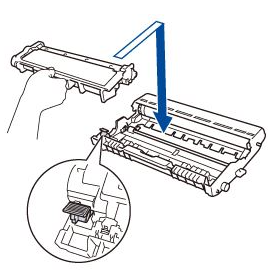
- Reinstall the drum unit and toner cartridge assembly into the machine
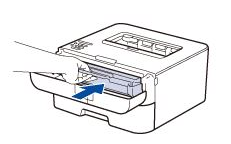
- Close the machine's cover, pressing firmly on each side until the cover clicks into place
Print 10 - 15 blank pages from your computer to further clean any remaining debris left on the drum surface
Quickly press OK three times to print the Printer Settings Report
- If the print quality is acceptable, the issue has been resolved
- If the print quality is still faint, light, faded or blank, a second manual drum cleaning may be needed. Repeat the steps above.
- If the print quality is still faint, light, faded or blank after performing at least two manual drum cleanings, the toner cartridge will need to be replaced to resolve this issue
- If the issue isn't resolved after you replace the toner cartridge, or the drum surface is scratched/damaged, the drum unit will need to be replaced
The issue is likely caused by a foreign object or material getting inside the machine
Was this article helpful?
That’s Great!
Thank you for your feedback
Sorry! We couldn't be helpful
Thank you for your feedback
Feedback sent
We appreciate your effort and will try to fix the article