When logging out of Partner, you must exit the program. Clicking the 'x' at the top right of the screen is not logging out. When you click the 'x', you are still logged in on the client server.
When multiple people are logged into one client server, it slows the system down. We have been contacted by PCC several times over the years because someone is 'logged in' upwards of 15 - 20 instances because they didn't properly log out.
To log out of Partner:
Using Unix prompts:
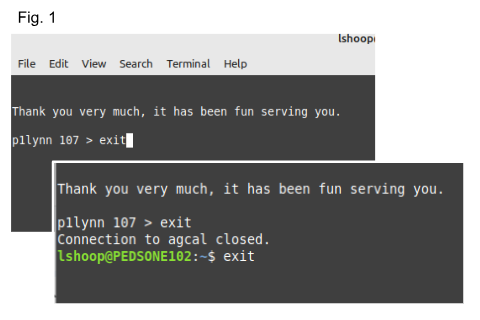
See Fig. 1:
- F12 back to the prompt (>)
- type "exit" and press enter
- type "exit" and press enter again
Using Windows:
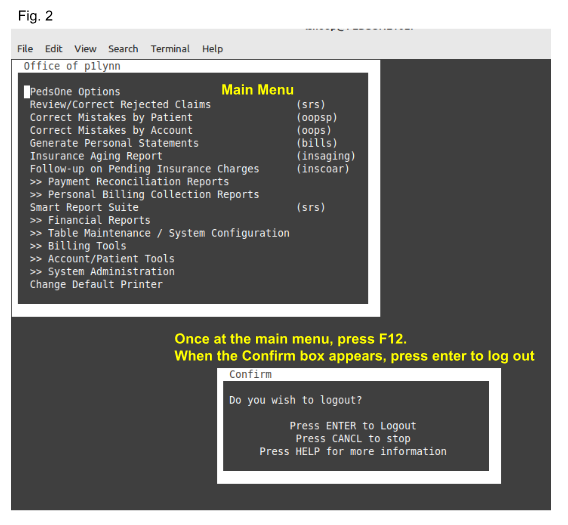
- F12 back to your main menu "Office of p1name" (see Fig. 2)
- Once at the main menu, press F12
- When the 'confirm' box appears, press enter to log out
- At the next screen, you will be at the Unix prompt
See Fig. 1
- type "exit" and press enter
- type "exit" and press enter again
To log out of the EHR:
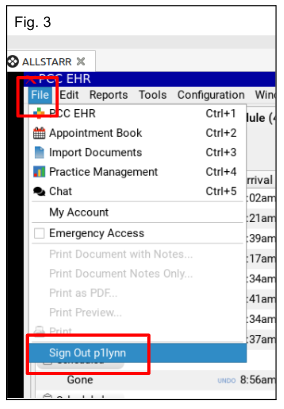
- From the File dropdown menu, click 'sign out p1name' (Fig. 3)
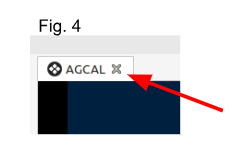
- Click the 'x' at the top left of your screen which will close out this session (Fig. 4)
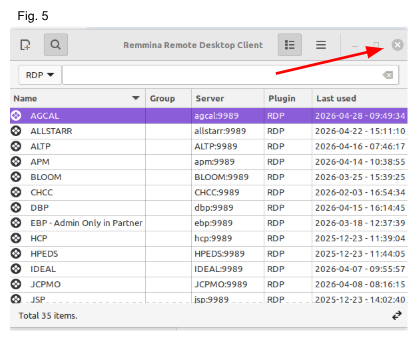
- Click the 'x' at the top right of your Remmina Interface box to close out of Remmina (Fig. 5)
Was this article helpful?
That’s Great!
Thank you for your feedback
Sorry! We couldn't be helpful
Thank you for your feedback
Feedback sent
We appreciate your effort and will try to fix the article