Open your calendar and click the gear icon at the top right and choose ‘settings’
Scroll down to Notification Settings and turn off the notifications in this section.
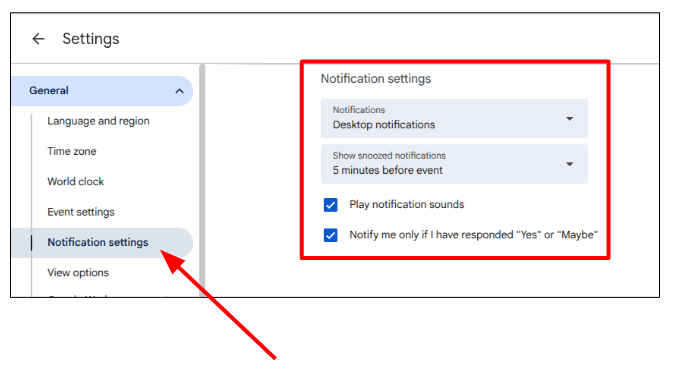 Be sure to set a reminder if you need one, to turn them back on afterwards.
________________________________________________________________________________________________
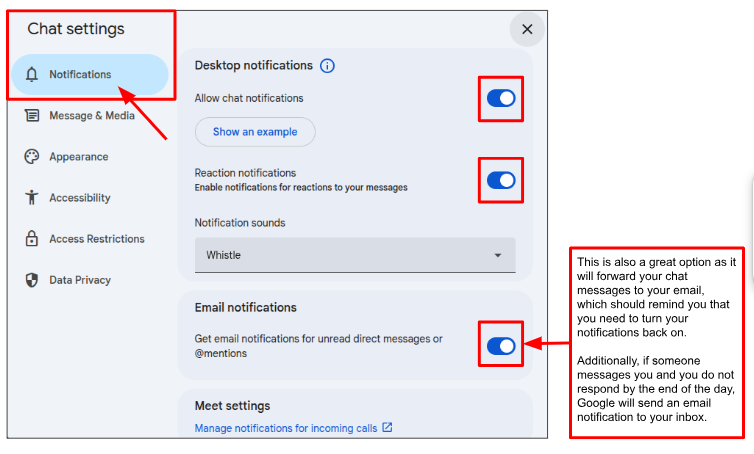
To Mute Chat Notifications Only:
Click on the gear icon at the top right of your chat screen to open your settings menu.
Here you can toggle on/off the chat notifications, as well as change other settings.
Calendar Notifications on Your Task Bar:
You may get notifications on your task bar for calendar items that you don't see on your Google calendar. They are on your system calendar.
To find the system calendar, follow these steps:
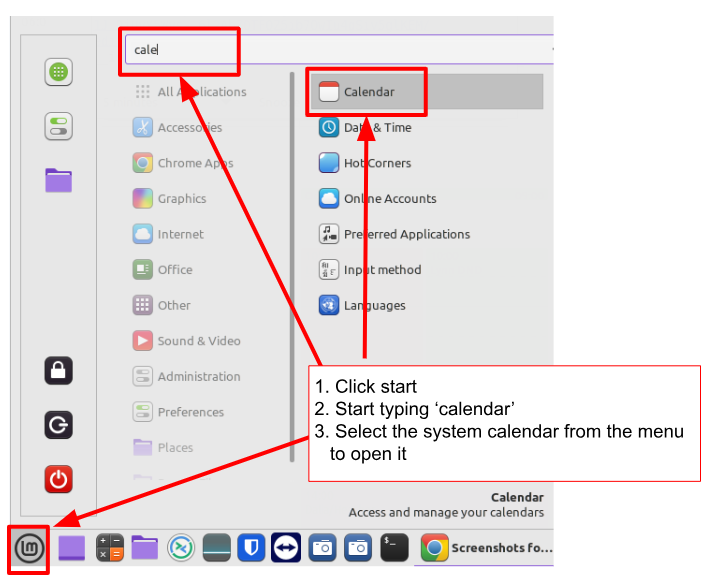
Once the calendar is open, you can make changes here so that you will no longer receive random 'unknown' notifications.
Was this article helpful?
That’s Great!
Thank you for your feedback
Sorry! We couldn't be helpful
Thank you for your feedback
Feedback sent
We appreciate your effort and will try to fix the article